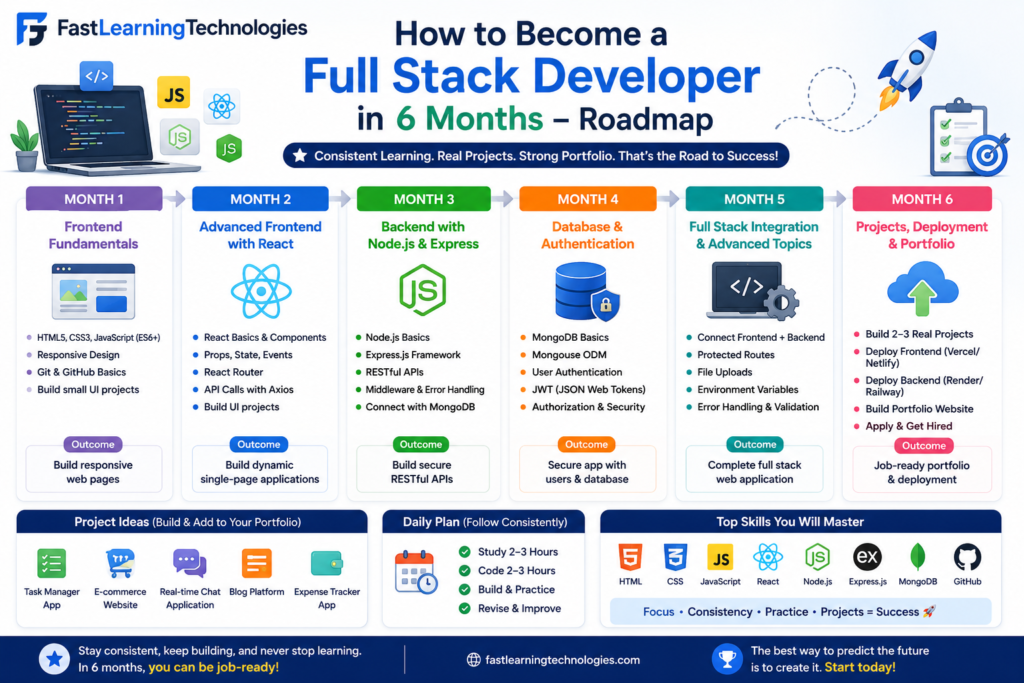
Full Stack Developer Roadmap 2026: How to Become a Full Stack Developer in 6 Months
If you are searching for a full stack developer roadmap, you probably want a clear learning path without wasting months on random tutorials. Full stack development means learning both frontend and backend skills so you can build complete web applications.
The problem is not lack of resources. The real problem is confusion. Beginners often jump from HTML to React, then Python, then Java, then DevOps, without completing one proper path. This 6-month roadmap will help you learn in the right order, build projects, prepare for interviews, and move toward job-ready skills.
What Is a Full Stack Developer?
A full stack developer is a person who can work on both the visible part and the server-side part of a website or application. The visible part is called frontend. The server-side part is called backend.
Frontend development includes layout, design, buttons, forms, navigation, and user experience. Backend development includes database, login system, APIs, business logic, and server-side operations.
A full stack developer usually works with tools like:
| Area | Tools |
|---|---|
| Frontend | HTML, CSS, JavaScript |
| Frontend Framework | React JS |
| Backend | Node.js, Express.js, Java, Python |
| Database | MongoDB, MySQL, PostgreSQL |
| Version Control | Git, GitHub |
| Deployment | Netlify, Vercel, Render, AWS basics |
| API | REST API |
For beginners, the best approach is to start with one stack. Do not try to learn everything at once. A common beginner-friendly option is the MERN Stack: MongoDB, Express.js, React JS, and Node.js.
Month 1: Learn HTML, CSS, and Basic Web Design
The first month of your full stack developer roadmap should focus on frontend basics. Do not skip HTML and CSS. Many beginners jump directly to JavaScript or React, but weak frontend basics create problems later.
Start with HTML. Learn headings, paragraphs, images, links, forms, tables, lists, semantic tags, and page structure. Then move to CSS. Learn colors, fonts, spacing, margin, padding, flexbox, grid, responsive design, and media queries.
By the end of Month 1, you should be able to create simple web pages without copying everything from tutorials.
Build these projects:
| Project | Skills Covered |
|---|---|
| Personal Portfolio Page | HTML structure, CSS styling |
| Landing Page | Layout, sections, buttons |
| Responsive Blog Page | Mobile-friendly design |
| Contact Form Page | Forms and inputs |
Focus on clean design, not complicated animations. Recruiters do not expect freshers to design like senior UI designers. But they do expect your pages to look neat, responsive, and usable.
Month 2: Learn JavaScript Properly
JavaScript is the most important skill in full stack development. If your JavaScript is weak, React and backend development will feel difficult.
In Month 2, focus on JavaScript fundamentals. Learn variables, data types, operators, conditions, loops, functions, arrays, objects, DOM manipulation, events, forms, local storage, and basic error handling.
Do not just watch videos. Write code daily. JavaScript becomes clear only when you solve small problems and build interactive features.
Important topics:
| Topic | Why It Matters |
|---|---|
| Functions | Needed everywhere in coding |
| Arrays and Objects | Used in real data handling |
| DOM Manipulation | Makes pages interactive |
| Events | Handles user actions |
| Local Storage | Stores simple browser data |
| Fetch API | Connects with backend/API data |
Build these projects:
| Project | Skills Covered |
|---|---|
| To-Do App | DOM, events, local storage |
| Calculator | Logic and functions |
| Quiz App | Conditions, arrays, score logic |
| Weather App | API and JSON basics |
By the end of Month 2, you should understand how websites become interactive.
Month 3: Learn React JS for Frontend Development
React JS is one of the most popular frontend libraries for full stack developers. It helps you build modern, component-based web applications.
In Month 3, learn React basics step by step. Start with components, props, state, events, conditional rendering, lists, forms, hooks, and routing. Then learn how to connect React with APIs.
React may feel confusing at first because it changes how you think about frontend development. Instead of writing one long page, you break the application into small reusable components.
Important React topics:
| Topic | Purpose |
|---|---|
| Components | Reusable UI blocks |
| Props | Pass data between components |
| State | Manage changing data |
| Hooks | Use features like useState and useEffect |
| React Router | Create multiple pages |
| API Calls | Fetch backend data |
| Forms | Handle user input |
Build these projects:
| Project | Resume Value |
|---|---|
| React Portfolio | Shows frontend skill |
| Product Listing Page | Shows components and props |
| Movie Search App | Shows API integration |
| Admin Dashboard UI | Shows layout and routing |
By the end of Month 3, your frontend skills should be strong enough to build modern interfaces.
Month 4: Learn Backend Development with Node.js and Express
Month 4 is where you move from frontend to backend. This is where many beginners struggle because backend development is less visual. But it is important because full stack developers must understand how data moves between frontend, server, and database.
Start with Node.js basics. Learn what a server is, how requests and responses work, and how backend routes are created. Then learn Express.js to create APIs.
Important backend topics:
| Topic | Why It Matters |
|---|---|
| Node.js | Runs JavaScript on server |
| Express.js | Builds backend APIs |
| Routes | Handles URL requests |
| Middleware | Processes requests |
| REST API | Connects frontend and backend |
| Authentication | Handles login and access |
| Error Handling | Makes apps stable |
Build small APIs first. For example, create APIs for users, products, tasks, or student records.
Backend project ideas:
| Project | Skills Covered |
|---|---|
| Task API | CRUD operations |
| Student Management API | Routes and data handling |
| Product API | REST API structure |
| Login System | Authentication basics |
Do not ignore API testing tools. Learn Postman or Thunder Client. These tools help you test backend APIs before connecting them with frontend.
Month 5: Learn Database and Build Full Stack Projects
In Month 5, learn how to store and manage data. A full stack application is incomplete without a database.
You can start with MongoDB if you are learning MERN Stack. You can also learn MySQL if your goal is enterprise or backend development. Both are useful. MongoDB is common in JavaScript-based projects, while MySQL is widely used in many business applications.
Important database topics:
| Topic | Purpose |
|---|---|
| Collections / Tables | Store structured data |
| Create Data | Add new records |
| Read Data | Fetch records |
| Update Data | Modify records |
| Delete Data | Remove records |
| Relationships | Connect data logically |
| Validation | Prevent wrong data |
Now start building complete full stack projects. This is where your resume becomes stronger.
Build at least two projects:
| Project | Features to Add |
|---|---|
| Job Portal App | Login, job posting, apply option, admin panel |
| E-Commerce App | Product page, cart, checkout flow, user login |
| Student Management System | Add, edit, delete, search records |
| Appointment Booking App | User booking, date/time selection, dashboard |
A project becomes resume-worthy when it has frontend, backend, database, authentication, and deployment.
Month 6: Deployment, GitHub, Resume, and Interview Preparation
Month 6 should be focused on job readiness. Learning tools is not enough. You need to package your skills properly.
First, learn Git and GitHub. Upload all your projects with clean code and proper README files. A good README should include project overview, features, tools used, screenshots, setup steps, and live demo link.
Next, learn deployment. Deploy frontend projects on Netlify or Vercel. Deploy backend projects on Render or similar platforms. Learn basic environment variables and database connection setup.
Job-readiness checklist:
| Task | Why It Matters |
|---|---|
| GitHub Profile | Shows your code |
| Live Project Links | Shows working applications |
| Resume Projects | Proves practical skill |
| LinkedIn Profile | Helps recruiter visibility |
| Interview Practice | Improves selection chances |
| Mock Interviews | Builds confidence |
Prepare these interview topics:
| Area | Questions to Prepare |
|---|---|
| HTML/CSS | Layout, forms, responsiveness |
| JavaScript | Functions, arrays, objects, DOM |
| React | Components, hooks, props, state |
| Backend | APIs, routes, middleware |
| Database | CRUD, schema, queries |
| Projects | Features, challenges, improvements |
By the end of 6 months, you should have at least three strong projects and one deployed full stack application.
Full Stack Developer Salary After 6 Months of Learning
A 6-month roadmap can make you job-ready, but salary depends on your skill level, projects, confidence, and interview performance.
Freshers in Bangalore commonly start around ₹3 LPA to ₹5 LPA. Strong candidates with live projects, GitHub, internships, and good JavaScript skills can target better entry-level roles.
Here is a practical salary view:
| Level | Estimated Salary Range |
|---|---|
| Fresher | ₹3 LPA – ₹5 LPA |
| Strong Fresher | ₹5 LPA – ₹7 LPA |
| 1–2 Years Experience | ₹5 LPA – ₹9 LPA |
| 3–5 Years Experience | ₹8 LPA – ₹15 LPA |
| Senior Developer | ₹15 LPA – ₹25 LPA+ |
Do not trust any roadmap that promises a high salary only by watching videos. Recruiters check projects, coding basics, communication, and problem-solving.
Best Full Stack Developer Roadmap for Beginners
Here is the simple 6-month full stack developer roadmap:
| Month | What to Learn |
|---|---|
| Month 1 | HTML, CSS, responsive design |
| Month 2 | JavaScript fundamentals |
| Month 3 | React JS |
| Month 4 | Node.js and Express.js |
| Month 5 | MongoDB/MySQL and full stack projects |
| Month 6 | Deployment, GitHub, resume, interviews |
Weekly learning plan:
| Week | Focus |
|---|---|
| Week 1–4 | Build static websites |
| Week 5–8 | Build JavaScript projects |
| Week 9–12 | Build React apps |
| Week 13–16 | Build backend APIs |
| Week 17–20 | Connect database and backend |
| Week 21–24 | Deploy projects and prepare for interviews |
This roadmap works only if you practice daily. Aim for 2 to 3 hours of focused learning every day. On weekends, spend extra time building projects.
FAQ: Full Stack Developer Roadmap
1. What is the best full stack developer roadmap for beginners?
The best full stack developer roadmap starts with HTML, CSS, JavaScript, React, backend development, database, full stack projects, deployment, and interview preparation.
2. Can I become a full stack developer in 6 months?
Yes, you can become job-ready in 6 months if you practice daily, build projects, learn one stack properly, and prepare for interviews.
3. Which stack is best for beginners?
MERN Stack is beginner-friendly because it uses JavaScript for both frontend and backend.
4. Is full stack development hard?
It is not hard if you follow the right order. It becomes difficult when beginners jump between too many tools.
5. Do I need a degree to become a full stack developer?
A degree can help, but practical skills, projects, GitHub, and interview preparation matter a lot for fresher roles.
6. How many projects should I build?
Build at least three strong projects. One should be a complete full stack project with frontend, backend, database, and deployment.
7. Is JavaScript required for full stack development?
Yes. JavaScript is essential for frontend development and also useful for backend development with Node.js.
8. What salary can a fresher full stack developer expect?
Freshers can commonly expect around ₹3 LPA to ₹5 LPA. Strong project-based candidates may target higher entry-level packages.
9. What is the fee for Full Stack Developer Course at Fast Learning Technologies?
Course fees may vary based on batch type, duration, and training mode. Contact Fast Learning Technologies directly for the latest fee details.
10. Does Fast Learning Technologies provide placement support?
Yes. Fast Learning Technologies, Nagavara provides full stack training with live projects, interview preparation, and 100% placement support.