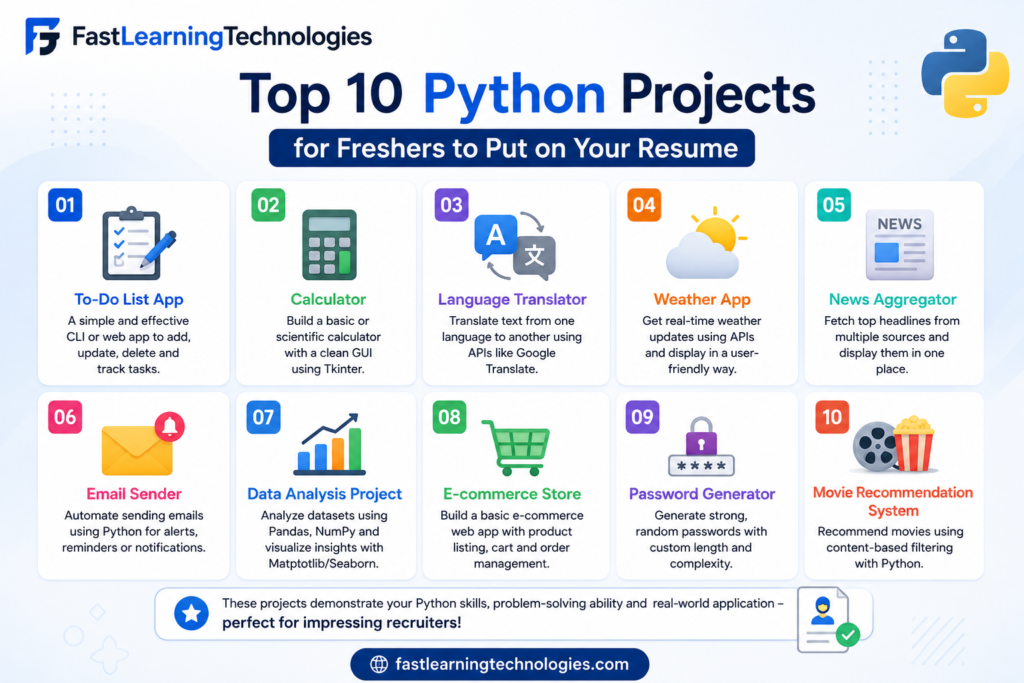
Python Projects for Beginners in 2026: Top 10 Python Projects for Freshers to Put on Your Resume
If you are searching for python projects for beginners, you are probably trying to build a resume that looks practical, not empty. Python is one of the best starting points for freshers because it is beginner-friendly and useful in web development, automation, data analytics, AI, and software testing.
But here is the real issue: not every Python project improves your resume. A basic calculator or “Hello World” project will not impress recruiters. You need projects that show logic, problem-solving, database use, file handling, APIs, dashboards, or real-world automation.
This guide covers the top 10 Python projects freshers can build and add to their resume in 2026.
Why Python Projects for Beginners Matter for Freshers
For freshers, projects are proof of skill. Recruiters know that most beginners do not have real work experience. So, they check whether you have built something practical.
A good Python project shows that you understand more than theory. It proves that you can write code, solve a problem, use tools, handle errors, and explain your work during an interview.
Python projects also help you stand out for entry-level roles such as:
| Role | Useful Python Project Type |
|---|---|
| Python Developer | Web apps, automation tools |
| Data Analyst | Dashboards, data cleaning projects |
| Software Tester | Automation scripts, Selenium projects |
| Backend Developer | Flask/Django apps, API projects |
| AI/ML Fresher | Prediction models, chatbot projects |
Freshers in India can target beginner-level Python roles, internships, support developer roles, automation roles, and data-related roles. Salary depends on skills, location, projects, and interview performance. For many entry-level Python roles, freshers can expect around ₹3 LPA to ₹6 LPA, depending on project quality and job profile.
Top 10 Python Projects for Beginners to Add to Your Resume
Below are 10 resume-friendly Python projects that freshers can build in 2026.
| No. | Project Name | Best For | Difficulty |
|---|---|---|---|
| 1 | Student Management System | Core Python + Database | Beginner |
| 2 | Expense Tracker App | File Handling + Logic | Beginner |
| 3 | Weather App Using API | API Integration | Beginner |
| 4 | Resume Parser | Text Processing | Intermediate |
| 5 | Web Scraper | Automation | Intermediate |
| 6 | To-Do App with Database | CRUD Operations | Beginner |
| 7 | Quiz Application | Logic + UI | Beginner |
| 8 | Sales Data Dashboard | Data Analytics | Intermediate |
| 9 | Email Automation Tool | Automation | Intermediate |
| 10 | Chatbot Using Python | AI Basics | Intermediate |
1. Student Management System
A student management system is one of the best Python projects for freshers. It allows you to add student details, update records, delete records, and search student information.
You can build this project using Python and SQLite. If you want to make it better, you can add a simple Tkinter interface or a Flask web interface.
Skills shown:
| Skill | What It Proves |
|---|---|
| CRUD operations | You can create, read, update, delete data |
| SQLite | You understand basic databases |
| Python functions | You can structure code |
| Error handling | You can manage invalid inputs |
This project is useful because many real business applications use similar database operations.
2. Expense Tracker App
An expense tracker helps users record daily spending, categorize expenses, and calculate monthly totals. This is a simple project, but it becomes resume-worthy when you add reports and charts.
You can store data in CSV, JSON, or SQLite. You can also use Matplotlib to show spending graphs.
Features to include:
| Feature | Resume Value |
|---|---|
| Add income and expenses | Shows input handling |
| Category-wise report | Shows logic building |
| Monthly summary | Shows data calculation |
| Chart view | Shows visualization basics |
This project is good for freshers because it solves a common real-life problem.
3. Weather App Using API
A weather app is a useful project because it shows that you can connect Python with external services. You can use a weather API to fetch live temperature, humidity, wind speed, and weather conditions.
This project teaches API requests, JSON data handling, and user input management.
Tools you can use:
| Tool | Purpose |
|---|---|
| Requests | Fetch API data |
| JSON | Read API response |
| Tkinter or Flask | Build interface |
| OpenWeather-style API | Weather data source |
In your resume, mention that the app fetches real-time data using API integration. Recruiters value this because many backend and automation jobs require API knowledge.
4. Resume Parser
A resume parser reads a resume file and extracts details such as name, email, phone number, skills, and education. This project is more advanced than a calculator or basic form.
You can use Python libraries for text extraction and regular expressions. You can also add keyword matching for skills such as Python, SQL, Excel, Java, Django, or Power BI.
Skills shown:
| Skill | Use |
|---|---|
| Regex | Extract email and phone numbers |
| File handling | Read documents |
| Text processing | Clean and analyze text |
| Logic building | Match keywords |
This is a strong resume project because it connects Python with HR and recruitment use cases.
5. Web Scraper for Job Listings
A web scraper collects information from websites. For freshers, a job listing scraper can be very useful. It can collect job title, company name, location, required skills, and job links.
You can build this project using BeautifulSoup and Requests. Make sure you only scrape websites that allow it and avoid overloading any website.
Features to include:
| Feature | Value |
|---|---|
| Search by keyword | Shows user input logic |
| Extract job title and company | Shows HTML parsing |
| Save results to CSV | Shows file handling |
| Filter by location | Shows data filtering |
This project is strong for resumes because it shows automation and practical thinking.
6. To-Do App with Database
A to-do app may sound simple, but it becomes useful when you add login, database storage, task priority, deadlines, and task status.
You can build it as a command-line app first. Later, upgrade it using Flask or Django.
Important features:
| Feature | Skill |
|---|---|
| Add task | Basic CRUD |
| Mark as completed | Update logic |
| Delete task | Database operation |
| Set priority | Conditional logic |
| Store in SQLite | Database handling |
This project is useful for beginners because it teaches the foundation of many real applications.
7. Quiz Application
A quiz application is a good beginner project because it tests logic, scoring, lists, dictionaries, and user interaction. You can create questions on Python, general knowledge, aptitude, or technical interviews.
You can add multiple-choice questions, a timer, score tracking, and result feedback.
To improve this project, store questions in a database or JSON file. You can also create an admin panel to add new questions.
This project is suitable for freshers applying for Python trainee, software trainee, or internship roles.
8. Sales Data Dashboard
A sales data dashboard is one of the best Python projects for beginners who want to enter data analytics. You can use a sample sales dataset and create reports such as total sales, top products, monthly revenue, and region-wise performance.
Tools to use:
| Tool | Purpose |
|---|---|
| Pandas | Data cleaning |
| Matplotlib | Charts |
| Streamlit | Dashboard |
| CSV/Excel | Data source |
This project looks strong on a resume because it connects Python with business insights. It is useful for students targeting data analyst, MIS executive, business analyst, or Python analytics roles.
9. Email Automation Tool
An email automation tool can send emails to multiple users from a CSV file. You can add custom names, subject lines, and message templates.
This project is useful because automation is one of Python’s strongest use cases.
Features to include:
| Feature | Skill |
|---|---|
| Read contacts from CSV | File handling |
| Send emails | SMTP basics |
| Personalize message | String formatting |
| Error report | Exception handling |
This project is good for freshers because it shows real office automation. You can explain how it saves manual work and improves productivity.
10. Chatbot Using Python
A simple chatbot can answer basic questions using predefined responses. You can start with rule-based logic and later upgrade it using NLP libraries or AI APIs.
For a beginner resume, build a chatbot for a specific use case such as:
| Chatbot Type | Example |
|---|---|
| Course enquiry chatbot | Answers course questions |
| FAQ chatbot | Answers website FAQs |
| Resume help chatbot | Suggests resume tips |
| Support chatbot | Handles simple queries |
This project is relevant in 2026 because companies are using chatbots for customer support, education, HR, and marketing.
Tools Freshers Should Use in Python Projects
Using the right tools makes your project look more professional. Do not just write code and leave it on your laptop. Upload it to GitHub and document it properly.
Here are useful tools for Python beginners:
| Tool | Why It Matters |
|---|---|
| VS Code | Code editor |
| GitHub | Project portfolio |
| SQLite | Beginner database |
| Flask | Web app development |
| Pandas | Data analysis |
| Matplotlib | Data visualization |
| Streamlit | Dashboard building |
| Requests | API integration |
| BeautifulSoup | Web scraping |
| Tkinter | Basic GUI apps |
Freshers should also create a clear README file for every project. Add project overview, features, tools used, screenshots, setup steps, and future improvements.
How to Add Python Projects to Your Resume
Do not write projects in one plain line. Recruiters need to understand what you built and what skill it proves.
Bad example:
“Made Python project.”
Better example:
“Built a Python-based expense tracker using SQLite and Matplotlib to record expenses, generate monthly reports, and visualize category-wise spending.”
Use this format:
| Resume Field | What to Write |
|---|---|
| Project Name | Expense Tracker App |
| Tools Used | Python, SQLite, Matplotlib |
| Features | Add expense, category report, monthly summary |
| Outcome | Automated personal expense tracking |
| GitHub Link | Add project repository link |
Also prepare a short explanation for interviews. You should be able to explain the problem, features, tools, challenges, and improvements.
Which Python Project Should You Build First?
If you are a complete beginner, start with the to-do app or expense tracker. These projects help you learn input, conditions, loops, functions, and file handling.
If you already know basic Python, build a weather app, student management system, or quiz app. These projects introduce APIs, databases, and structured code.
If you want to target better fresher roles, build a sales dashboard, resume parser, chatbot, or web scraper. These projects show practical thinking and are more impressive for recruiters.
The best path is simple:
Build one basic project.
Build one database project.
Build one API or automation project.
Build one data or chatbot project.
Upload everything to GitHub.
This gives your resume more weight than only listing “Python” under skills.
FAQ: Python Projects for Beginners
1. What are the best Python projects for beginners?
The best Python projects for beginners include an expense tracker, student management system, to-do app, quiz app, weather app, web scraper, sales dashboard, and chatbot.
2. Can freshers add Python projects to their resume?
Yes. Freshers should add Python projects because projects show practical skills when they do not have work experience.
3. How many Python projects should I add to my resume?
Freshers should add 2 to 4 strong projects. Avoid adding too many small or incomplete projects.
4. Which Python project is best for placement?
A database-based project, API project, automation project, or dashboard project is better for placement because it shows real-world skills.
5. Is a calculator project good for a resume?
A calculator project is too basic for most resumes. It is fine for practice, but freshers should add stronger projects.
6. Do I need GitHub for Python projects?
Yes. GitHub helps recruiters see your code, README file, project structure, and consistency.
7. Which Python project is best for data analyst freshers?
A sales data dashboard using Pandas, Matplotlib, and Streamlit is a good choice for data analyst freshers.
8. Which Python project is best for automation?
An email automation tool, file organizer, web scraper, or report generator is useful for automation-focused roles.
9. What is the fee for Python training at Fast Learning Technologies?
The course fee may vary based on batch type, duration, and training mode. Contact Fast Learning Technologies directly for the latest fee details.
10. Does Fast Learning Technologies provide placement support?
Yes. Fast Learning Technologies, Nagavara provides Python training with practical projects, interview preparation, and 100% placement support.