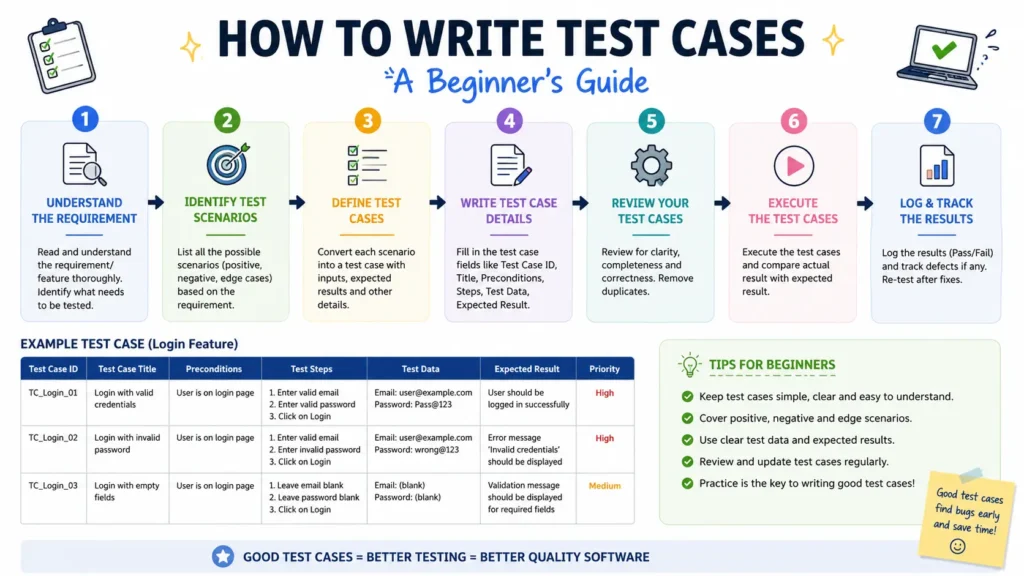
Knowing how to write test cases beginners is the single most practical skill for anyone starting out in software testing — more useful, at first, than any tool or framework. A well-written test case tells any tester exactly what to check, how to check it, and what “correct” looks like, without needing to ask anyone else. In this guide, we’ll walk through the standard test case format, a beginner-friendly step-by-step process, and three fully filled-out real examples — a login page, a registration form, and an e-commerce “add to cart” flow — so you can see exactly what a finished test case looks like, not just the theory behind it. We’ll also cover priority and severity, the mistakes that trip up most beginners, and how this one skill fits into a broader QA career.
Why Most “How to Write Test Cases” Guides Fall Short
Search for this topic and you’ll find plenty of guides that explain the test case fields in the abstract — ID, steps, expected result — and then stop, leaving you to figure out what a real, filled-out test case actually looks like. That gap is exactly where most beginners get stuck: they understand the theory but freeze the first time they have to write one from scratch for a real login page or form. This guide is built the other way around — every concept is paired with a complete, realistic example using specific data, exact UI element names, and observable expected results, so you can copy the pattern directly into your own work rather than reverse-engineering it from a blank template.
What Is a Test Case? (And How It Differs from a Test Scenario)
A test case is a documented set of steps, input data, and expected results used to verify that one specific condition in an application works correctly. It’s the “how” of testing. A test scenario, on the other hand, is the “what” — a high-level statement of something that needs to be tested, like “verify that a user can log in.”
Beginners often confuse the two, so here’s the simplest way to remember it: one test scenario usually breaks down into several test cases. “Verify user login” (scenario) might become: verify login with valid credentials, verify login with an invalid password, verify login with an empty username field, and verify login with a locked account — each one a separate test case with its own steps and expected result.
Standard Test Case Format: The Components You Need
Before writing your first test case, get familiar with the fields every solid test case should include:
| Field | What It Means |
|---|---|
| Test Case ID | A unique identifier, e.g. TC_LOGIN_001, so it can be tracked and referenced |
| Title | A short, specific description of what’s being verified |
| Preconditions | What must be true or set up before the test can run |
| Test Steps | Numbered actions written so clearly that another person can follow them without asking questions |
| Test Data | The exact values used in the steps — real usernames, amounts, or inputs, not placeholders |
| Expected Result | What should happen if the feature works correctly — must be specific and observable |
| Actual Result | What actually happened, filled in after execution |
| Status | Pass or Fail, based on comparing expected vs. actual result |
How to Write a Test Case: Step-by-Step for Beginners
- Pick one specific condition to test. Don’t try to cover an entire feature in one test case — “test the login page” is a scenario, not a test case. Narrow it down to one behavior, like “login with valid credentials.”
- Write preconditions first. State exactly what needs to be true before the test starts — for example, “user is registered and account is active,” or “browser is open at the login page.”
- Break the action into numbered steps. Start each step with an action verb — Enter, Click, Select, Navigate, Verify. Reference the exact UI element name, not a vague description.
- Use real test data, not placeholders. Write “Enter priya.test@example.com” instead of “enter a valid email.” Specific data makes the test repeatable and removes guesswork for whoever runs it next.
- Write one clear, observable expected result. Avoid vague outcomes like “it should work.” Instead: “The dashboard page loads and displays ‘Welcome, Priya’ with no error messages.”
- Review it as if you’re a stranger. Read your test case again and ask: could someone who has never seen this application follow it exactly and get the same result? If not, add detail until they can.
Real Test Case Examples (Filled Out, Not Just Templates)
Most beginner guides show an empty template and leave you to figure out the rest. Here are three complete, filled-out test cases so you can see exactly what “done” looks like.
Example 1: Login Page — Valid Credentials
| Test Case ID | TC_LOGIN_001 |
| Title | Verify login with valid username and password |
| Preconditions | User is registered; account is active; browser is open at the login page |
| Test Steps | 1. Enter “priya.test@example.com” in the Username field. 2. Enter “SecurePass@123” in the Password field. 3. Click the “Login” button. |
| Expected Result | The dashboard page loads within 3 seconds, displays “Welcome, Priya,” and no error messages appear. |
Example 2: Registration Form — Invalid Email Format
| Test Case ID | TC_REG_004 |
| Title | Verify registration form rejects an invalid email format |
| Preconditions | User is on the registration page; no account exists for the test email |
| Test Steps | 1. Enter “Rahul Sharma” in the Full Name field. 2. Enter “rahul.sharma@@test” in the Email field. 3. Enter “Passw0rd!” in the Password field. 4. Click the “Create Account” button. |
| Expected Result | The form does not submit. An inline error message “Please enter a valid email address” appears below the Email field. |
Example 3: E-Commerce — Add to Cart
| Test Case ID | TC_CART_002 |
| Title | Verify adding a single in-stock item to the cart updates the cart count and total |
| Preconditions | User is logged in; product “Wireless Mouse” (₹799) is in stock; cart is currently empty |
| Test Steps | 1. Navigate to the “Wireless Mouse” product page. 2. Click the “Add to Cart” button once. 3. Click the cart icon in the top navigation bar. |
| Expected Result | The cart icon shows a count of “1.” The cart page lists “Wireless Mouse” with quantity 1 and a total of ₹799. |
Common Mistakes Beginners Make When Writing Test Cases
- Vague steps. “Enter username and password and click login” forces every reader to guess at details. Break it into separate, specific steps instead.
- Combining multiple checks into one test case. If a single test case verifies five different things, a failure tells you almost nothing about what actually broke. One test case, one condition.
- Skipping preconditions. Without stating what must be true beforehand, testers waste time debugging “false fails” caused by an unready environment rather than an actual bug.
- Writing expected results that aren’t observable. “It should work correctly” isn’t testable. State exactly what should appear, change, or happen.
- Only writing positive test cases. Beginners often test only the “happy path” and skip negative and boundary cases — which is usually where the real bugs live.
- Not reusing or organizing test cases. Scattering test cases across random documents makes regression testing painful. Group related test cases by feature or module from day one.
Best Practices for Writing Test Cases That Actually Get Used
- Keep each test case independent — it shouldn’t rely on another test case having run first, wherever possible.
- Use consistent naming conventions for test case IDs (e.g., TC_MODULE_number) so your test suite stays organized as it grows.
- Cover positive, negative, and boundary cases for every feature, not just the ideal path.
- Map every test case back to a requirement, so you can prove coverage when someone asks “did we test this?”
- Get your test cases peer-reviewed before execution — a second pair of eyes catches ambiguous steps you won’t notice yourself.
Test Case Priority and Severity: A Field Beginners Often Skip
Beyond the core fields, most real-world teams also track priority and severity on each test case, and beginners often mix the two up:
- Priority is about business importance — how urgently this test case needs to be executed. A test case for the checkout payment flow is usually High priority because it’s core to the business, regardless of how “bad” a failure looks.
- Severity is about technical impact — how badly a defect breaks the application if this test case fails. A typo in a footer link is Low severity; a crash on checkout is Critical severity.
A test case can be high priority but low severity, or the reverse — for example, a rarely-used admin settings page might be low priority to test but high severity if it does fail, because it could expose sensitive data. Tagging both fields helps a team decide what to test first when time is limited, which happens on almost every real project.
How This Skill Fits Into a QA Career
Writing clean, reusable test cases isn’t just an exercise — it’s the skill hiring managers actually check for in QA interviews and on-the-job trial tasks, before they ask about any tool. Testers who can hand a stranger a test case and have it followed exactly, first try, consistently move faster into automation, SDET, and QA lead roles, because that same discipline carries over into writing reliable automated test scripts later. If you’re in Bangalore and building this skill from scratch, working through real applications — rather than only textbook examples — is what separates test case writing you can talk about confidently in interviews from test case writing you’ve only read about.
Manual Test Cases vs. Automated Test Cases: When to Write Which
Not every test case needs to be automated, especially as a beginner. Write test cases manually first — it forces you to understand the application and think through edge cases clearly. Once a test case is stable, repeated often (like regression checks), and unlikely to change frequently, it becomes a strong candidate for automation using a tool like Selenium. Trying to automate before you’re comfortable writing solid manual test cases usually just means automating a badly designed test.
2026 Trend: AI-Assisted Test Case Writing
A growing number of QA teams in 2026 are using AI tools to auto-generate a first draft of test cases from requirements documents or user stories. This speeds things up, but it hasn’t removed the need for testers who understand what a good test case looks like — if anything, it’s made that skill more important. AI-generated test cases still need a human to check the preconditions make sense, the steps are unambiguous, and the expected results are genuinely observable. Beginners who master the fundamentals in this guide will be far better placed to review and correct AI-generated test cases than someone who has only ever copied templates without understanding why each field matters.
Quick Checklist: Is Your Test Case Ready to Execute?
Before you consider a test case finished, run it through this checklist:
- Does it test exactly one condition, not several bundled together?
- Are the preconditions stated clearly enough that someone else could set up the environment without asking you?
- Does every step start with a clear action verb and reference the exact UI element name?
- Is the test data specific (real values), not a placeholder like “valid input”?
- Is the expected result observable and specific enough that pass/fail is never ambiguous?
- Have you covered the positive case, at least one negative case, and any obvious boundary case for this condition?
If you can check off all six, your test case is ready to hand to another tester — or to yourself, three months from now, when you’ve forgotten the context and need to rerun it during regression testing.
Frequently Asked Questions
How do you write a test case for beginners?
Start by picking one small, specific condition to verify — not a whole feature. Give it a unique ID and short title, list the preconditions, write numbered steps using exact UI element names and real test data, then state one clear, observable expected result. Keep each test case focused on a single condition so it’s easy to reuse and rerun.
What is the difference between a test case and a test scenario?
A test scenario describes what to test at a high level, such as “verify user login.” A test case describes exactly how to test it — specific steps, exact data, and one expected result. A single test scenario usually breaks down into several individual test cases.
What are the main components of a good test case?
A good test case includes a test case ID, title, preconditions, numbered test steps, test data, expected result, actual result, and status (pass/fail). Some teams also add priority and the module or feature being tested.
Do beginners need to know coding to write test cases?
No. Writing manual test cases requires no coding at all — just a clear understanding of the application’s expected behavior and attention to detail. Coding becomes relevant later, when you move from manual test cases into automating them with tools like Selenium.
How many test cases should a beginner write for one feature?
It depends on the feature, but a good starting habit is to cover the positive case (valid input), at least one or two negative cases (invalid input), and any obvious boundary or edge cases. For a simple login form, that’s usually 5–8 test cases at minimum.
What tools do beginners use to write and manage test cases?
Most beginners start with a simple spreadsheet (Excel or Google Sheets) before moving to dedicated test management tools like TestRail, Zephyr, or Jira with Xray once they’re working on a team with a larger test suite.
Ready to Practice Writing Test Cases on Real Projects?
Reading examples is a good start, but the fastest way to actually get good at writing test cases is practicing on real, evolving applications with feedback from an experienced tester. Our Manual Testing Training in Bangalore is built around exactly this — hands-on test case writing for real applications, not just templates. If you’re ready to go further and pair your test cases with automation, our Software Testing Master Program covers manual testing, Selenium automation, and placement support in one structured path. You can also check our placement records to see where recent QA batches have landed.