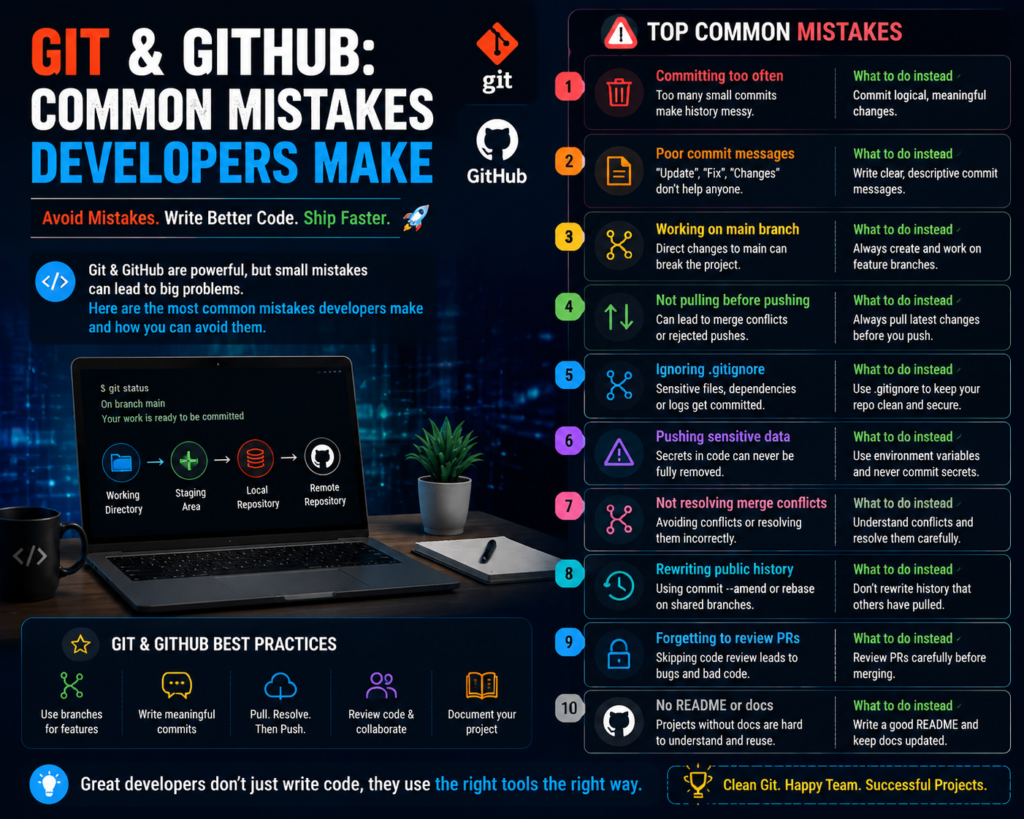
Git & GitHub: Common Mistakes Developers Make
Git and GitHub Mistakes Developers Make and How to Avoid Them
Git and GitHub mistakes developers make can create serious problems during software development. From losing important code changes to creating messy project histories, small mistakes in version control can affect productivity and teamwork.
Git and GitHub are essential tools for modern developers. Almost every professional software team uses them to manage code, collaborate, track changes, and maintain projects.
However, many beginners learn Git commands without understanding the correct workflow. This often leads to confusion, errors, and unnecessary problems.
At Fast Learning Technologies, we help learners develop practical programming skills and understand the tools used by professional developers.
In this article, we will discuss the most common Git and GitHub mistakes developers make and how to avoid them.
What Are Git and GitHub?
Before discussing mistakes, it is important to understand the difference.
Git
Git is a version control system that helps developers track changes in their code.
Developers use Git to:
- Save different versions of projects
- Manage code changes
- Create branches
- Restore previous versions
GitHub
GitHub is an online platform that stores Git repositories and allows developers to collaborate.
Developers use GitHub for:
- Sharing code
- Team collaboration
- Open-source projects
- Building developer portfolios
Git works locally on your computer, while GitHub helps you manage and share projects online.
1. Not Understanding Git Before Using Commands
One of the biggest mistakes beginners make is memorizing commands without understanding how Git works.
Many developers learn commands like:
- git add
- git commit
- git push
but do not understand:
- What a repository is
- How branches work
- How commits track changes
This creates problems when something goes wrong.
Better Approach:
Learn the basic Git workflow:
- Modify files
- Add changes
- Commit changes
- Push updates
Understanding the process is more important than remembering commands.
2. Making Huge Commits
A common mistake developers make is adding many unrelated changes into one commit.
Example:
A single commit includes:
- Website design updates
- Bug fixes
- New features
- Documentation changes
This makes the project history difficult to understand.
Better Practice:
Create small and meaningful commits.
Good commit example:
Added login validation feature
Bad commit example:
Updated everything
Clear commits help developers understand project changes easily.
3. Writing Poor Commit Messages
Commit messages are important because they explain what changed.
Many beginners write unclear messages like:
- “Fix”
- “Update”
- “Changes done”
- “Final version”
These messages do not provide useful information.
Better Commit Messages:
Examples:
- “Fixed user login authentication issue”
- “Added payment gateway integration”
- “Updated homepage responsive design”
Good commit messages make teamwork easier.
4. Uploading Sensitive Information to GitHub
One of the most dangerous Git mistakes developers make is accidentally uploading private information.
Examples:
- Passwords
- API keys
- Database credentials
- Secret configuration files
Once uploaded, this information can become a security risk.
Better Practice:
Use:
- Environment variables
- .gitignore files
- Secret management tools
Example files that should usually not be uploaded:
.env
config files
private keys
Always check your files before pushing code.
5. Not Using Branches Properly
Branches allow developers to work on different features without affecting the main project.
Many beginners directly make changes to the main branch.
This can create problems.
Better Workflow:
Use separate branches:
main
 |
 |-- feature-login
 |
 |-- bug-fix-payment
Benefits:
- Safer development
- Easier testing
- Better teamwork
6. Ignoring Git Pull Before Starting Work
Developers working in teams often face conflicts because they forget to update their local code.
Before starting work, developers should usually check for updates.
Example:
git pull
This helps keep the local project synchronized.
7. Not Understanding Merge Conflicts
Merge conflicts happen when Git cannot automatically combine changes.
Many beginners panic when they see conflict messages.
However, conflicts are a normal part of teamwork.
How to Handle Conflicts:
- Read the conflict message
- Compare changes
- Choose the correct version
- Test the application
- Commit the solution
Learning conflict resolution is an important developer skill.
8. Using GitHub Only as Storage
Many developers use GitHub only to upload code.
This wastes many valuable features.
GitHub can also help developers:
- Build portfolios
- Collaborate
- Track issues
- Review code
- Contribute to open-source projects
A professional GitHub profile can help during job applications.
9. Not Creating Backup Before Major Changes
Another common mistake is making large changes without creating a safe backup.
Before major updates, developers should:
- Create a new branch
- Commit existing work
- Test changes carefully
This reduces the risk of losing important code.
10. Ignoring Documentation
Many developers focus only on writing code and forget documentation.
A good project should explain:
- What the project does
- How to install it
- How to run it
- How others can contribute
A README file is often the first thing employers and developers check.
Essential Git Commands Every Developer Should Know
Check Project Status
git status
Shows changed files.
Add Changes
git add .
Prepares files for commit.
Save Changes
git commit -m "message"
Creates a project snapshot.
Upload Changes
git push
Uploads code to GitHub.
Download Latest Changes
git pull
Updates your local project.
Create a Branch
git branch branch-name
Creates a new development branch.
Best Git and GitHub Practices for Developers
Follow these habits:
Write Clear Commit Messages
Make every commit understandable.
Commit Regularly
Do not wait until the entire project is complete.
Use Branches
Keep features and fixes organized.
Review Code Before Push
Always check your changes.
Learn Git Commands Properly
Understanding Git improves development confidence.
How Learning Git Improves Your Developer Career
Git is not just a tool.
It is a professional skill expected by companies.
Whether you become:
- Frontend Developer
- Backend Developer
- Full Stack Developer
- Data Engineer
- DevOps Engineer
you will likely use Git regularly.
A developer who understands Git can collaborate better and work more confidently in professional environments.
Learn Modern Development Skills With Fast Learning Technologies
Technology careers require more than programming knowledge.
Developers need to understand:
- Coding practices
- Version control
- Debugging
- Collaboration tools
- Industry workflows
Fast Learning Technologies helps students build practical skills required in modern IT careers.
By learning tools like Git, GitHub, programming languages, and development frameworks, learners can become more prepared for real-world opportunities.
Final Thoughts
The Git and GitHub mistakes developers make are usually caused by poor workflow habits, not difficult technical problems.
Learning Git properly can save time, prevent errors, and improve teamwork.
Good developers do not just write code.
They manage their code professionally.
Start practicing Git and GitHub correctly today to build stronger development skills.
Frequently Asked Questions (FAQs)
1. What are the most common Git mistakes beginners make?
Common mistakes include poor commit messages, not using branches, uploading sensitive files, and not understanding Git workflow.
2. Is GitHub necessary for developers?
Yes. GitHub helps developers manage projects, collaborate with teams, and showcase their coding skills.
3. Should beginners learn Git before programming?
Basic programming knowledge helps, but beginners can learn Git alongside programming projects.
4. How can developers avoid Git merge conflicts?
Developers can reduce conflicts by communicating, pulling updates regularly, and using proper branching practices.
5. Is Git a required skill for software developers?
Yes. Most professional development teams use Git, making it an important skill for software careers.